1. What is Asciidoctor?
Asciidoctor is a fast text processor and publishing toolchain for converting AsciiDoc content to HTML5, EPUB3, PDF, DocBook 5 (or 4.5) slidedecks and other formats. Asciidoctor is written in Ruby, packaged as a RubyGem and published to RubyGems.org. The gem is also packaged in several Linux distributions, including Fedora, Debian and Ubuntu. Asciidoctor is open source, hosted on GitHub, and released under the MIT license.
1.1. The Big Picture
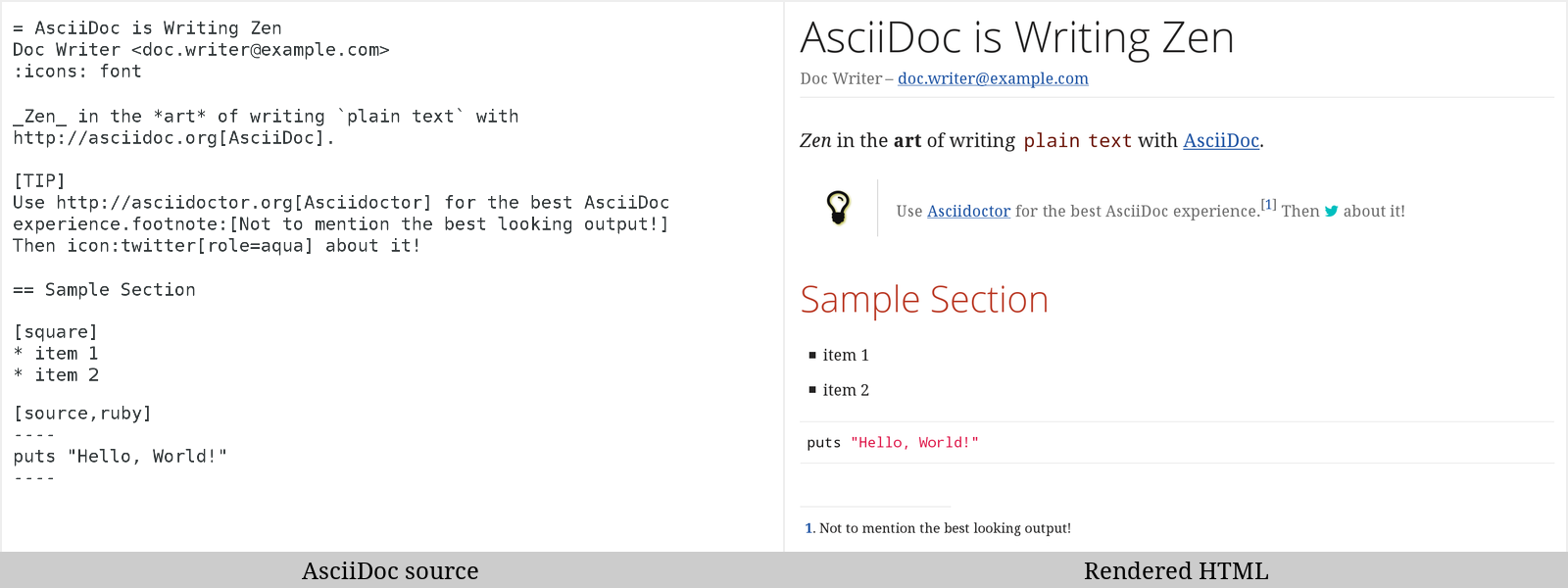
Asciidoctor reads content written in plain text, as shown in the panel on the left in the image below, and converts it to HTML5, as shown rendered in the right panel. Asciidoctor adds a default stylesheet to the HTML5 document, as shown, to provide a pleasant out-of-the-box experience.
1.2. Asciidoctor on the JVM
You can run Asciidoctor on the JVM using JRuby. You can also use AsciidoctorJ to invoke Asciidoctor’s APIs from Java and other JVM languages.
1.3. Asciidoctor.js
Asciidoctor can be used in JavaScript. Opal is used to transcompile the code from Ruby to JavaScript to make Asciidoctor.js, which can be used wherever JavaScript runs, such as in a web browser or on Node.js.
1.4. Asciidoctor’s Most Notable Benefits
While Asciidoctor aims to offer full compliance with the AsciiDoc syntax, it’s more than just a clone.
Asciidoctor uses a set of built-in ERB templates to generate HTML 5 and DocBook output that is structurally equivalent to what AsciiDoc produces. Any of these templates can be replaced by a custom template written in any template language available in the Ruby ecosystem. Custom template rendering is handled by the Tilt template abstraction library. Tilt is one of the most popular gems in the Ruby ecosystem.
Leveraging the Ruby stack isn’t the only benefit of Asciidoctor. Unlike the AsciiDoc Python implementation, Asciidoctor parses and converts the source document in discrete steps. This makes conversion optional and gives Ruby programs the opportunity to extract, add or replace information in the document by interacting with the document object model Asciidoctor assembles. Developers can use the full power of the Ruby programming language to play with the content in the document.
No coverage of Asciidoctor would be complete without mention of its speed. Despite not being an original goal of the project, Asciidoctor has proven startlingly fast. It loads, parses, and converts documents a 100 times as fast as the Python implementation. That’s good news for developer productivity and good news for GitHub or any server-side application that needs to render AsciiDoc markup. Asciidoctor also offers several levels of security, further justifying its suitability for server-side deployments.
Asciidoctor’s usage is not limited to the Ruby community. Thanks to JRuby, a port of Ruby to the JVM, Asciidoctor can be used inside Java applications as well. Plugins are available for Apache Maven, Gradle, and Rewrite. These plugins are based on the AsciidoctorJ for Asciidoctor.
Asciidoctor also ships with a command line interface (CLI).
The Asciidoctor CLI, asciidoctor, is a drop-in replacement for the asciidoc.py script from the AsciiDoc Python distribution.
1.4.1. AsciiDoc Syntax Processing
Asciidoctor reads and parses text written in the AsciiDoc syntax, then feeds the parse tree into a set of built-in templates to produce HTML5, PDF, DocBook 5, etc. You have the option of writing your own converter or providing Tilt-supported templates to customize the generated output or produce alternative formats.
Asciidoctor is a drop-in replacement for the original AsciiDoc Python processor (asciidoc.py).
The Asciidoctor test suite has > 1,500 tests to ensure compatibility with the AsciiDoc syntax.
|
In addition to the standard AsciiDoc syntax, Asciidoctor recognizes additional markup and formatting options, such as font-based icons (e.g., icon:fire[]) and UI elements (e.g., btn:[Save]).
Asciidoctor also offers a modern, responsive theme based on Foundation to style the HTML5 output.
1.5. Compared to Markdown
The most compelling reason to choose a lightweight markup language for writing is to minimize the number of technical concepts an author must grasp in order to be immediately productive. In other words, the goal is to be able to write without friction.
1.5.1. Getting your start with Markdown
The defacto lightweight markup language is Markdown. (At least, that’s what you call it at first). The main advantage of Markdown lies in its primitive syntax: its manual and cheatsheet are one and the same. But this advantage is also its greatest weakness.
As soon as authors need something slightly more complex than basic prose (e.g., tables, cross references, footnotes, embedded YouTube videos, etc.), they find themselves resorting to embedded HTML or seeking out more feature-rich implementations. Markdown has become a maze of different implementations, termed “flavors”, which make a universal definition evasive.
| The IETF has declared “there is no such thing as "invalid" Markdown.” See This Is Markdown! Or: Markup and Its Discontents. |
Here’s how the story inevitably goes. You start out with Markdown. Then it’s Markdown + X. Then Markdown + X + Y. And down the rabbit hole you go. What’s worse, X and Y often require you to sprinkle in HTML, unnecessarily coupling content with presentation and wrecking portability. Your instinct to choose Markdown is good. There are just better options.
1.5.2. Graduating to AsciiDoc
AsciiDoc presents a more sound alternative. The AsciiDoc syntax is more concise than (or at least as concise as) Markdown. At the same time, AsciiDoc offers power and flexibility without requiring the use of HTML or “flavors” for essential syntax such as tables, description lists, admonitions (tips, notes, warnings, etc.) and table of contents.
It’s important to understand that AsciiDoc was initially designed as a plain-text alternative to the DocBook XML schema. AsciiDoc isn’t stuck in a game of whack-a-mole trying to satisfy publishing needs like Markdown. Rather, the AsciiDoc syntax was explicitly designed with the needs of publishing in mind, both print and web. If the need arises, you can make full use of the huge choice of tools available for a DocBook workflow using Asciidoctor’s DocBook converter. That’s why mapping to an enterprise documentation format like DocBook remains a key use case for AsciiDoc.
And yet, AsciiDoc is simple enough to stand in as a better flavor of Markdown. But what truly makes AsciiDoc the right investment is that its syntax was designed to be extended as a core feature. This extensibility not only means that AsciiDoc has a lot more to offer, with room to grow, it also fulfills the objective of ensuring your content is maximally reusable.
1.5.3. Comparison by example
The following table shows the AsciiDoc syntax as it compares to Markdown. Since AsciiDoc supports a broader range of syntax than Markdown, this side-by-side comparison focuses mainly on areas where the syntax overlaps.
| Language Feature | Markdown | AsciiDoc |
|---|---|---|
Bold (constrained) |
|
|
Bold (unconstrained) |
|
|
Italic (constrained) |
|
|
Italic (unconstrained) |
n/a |
|
Monospace (constrained) |
|
|
Monospace (unconstrained) |
|
|
Link with label |
|
|
Relative link |
|
|
File link |
|
|
Cross reference |
|
|
Block ID / anchor |
|
|
Inline anchor |
n/a |
|
Inline image w/ alt text |
|
|
Block image w/ alt text |
n/a |
|
Section heading* |
|
|
Blockquote* |
|
|
Literal block |
|
Indented (by 1 or more spaces)
Delimited
|
Code block* |
|
|
Unordered list |
|
|
Ordered list |
|
|
Thematic break (aka horizontal rule)* |
|
|
Typographic quotes (aka “smart quotes”) |
Enabled through an extension switch, but offer little control in how they are applied. |
|
Document header |
Slapped on as “front matter”
|
Native support!
|
Admonitions |
n/a |
|
Sidebars |
n/a |
|
Block titles |
n/a |
|
Includes |
n/a |
|
URI reference |
|
|
Custom CSS classes |
n/a |
|
* Asciidoctor also supports the Markdown syntax for this language feature.
You can see that AsciiDoc has the following advantages over Markdown:
-
AsciiDoc uses the same number of markup characters or less when compared to Markdown in nearly all cases.
-
AsciiDoc uses a consistent formatting scheme (i.e., it has consistent patterns).
-
AsciiDoc can handle all permutations of nested inline (and block) formatting, whereas Markdown often falls down.
-
AsciiDoc handles cases that Markdown doesn’t, such as a proper approach to inner-word markup, source code blocks and block-level images.
| Certain Markdown flavors, such as Markdown Extra, support additional features such as tables and description lists. However, since these features don’t appear in “plain” Markdown, they’re not included in the comparison table. But they’re supported natively by AsciiDoc. |
Asciidoctor, which is used for converting AsciiDoc on GitHub and GitLab, emulates “the good parts” of the Markdown syntax, like headings, blockquotes and fenced code blocks, making migration from Markdown to AsciiDoc fairly simple. For details about migration, see Markdown Compatibility.
To read more about the shortcomings of Markdown, see these opinion pieces: